
Get month-end out of one person’s head.
Ops runs on dozens of small, repeatable tasks across a dozen tools. Record yourself doing one, or upload the Loom you made last quarter, and Clipstep turns it into an SOP with a screenshot for every step.
Upload a recording you already have, or record your screen right in Clipstep. Nothing to install.
Ops knowledge lives in calendars and heads.
Monthly tasks get forgotten between months.
Whoever runs month-end re-learns it every time, from memory.
The process spans five tools.
ERP, bank portal, spreadsheet, email, approval tool. No single tool’s help docs cover the whole thing.
Writing the SOP takes longer than doing the task.
So it never gets written, and the one person who knows becomes the bottleneck.
How it works for ops teams
- 01
Record it the next time you do it
Run the real task and talk through what you’re doing. Use the Clipstep recorder right in your browser, or any tool you already have: Loom, Zoom, Teams, QuickTime or OBS.
- 02
Generate the SOP
Clipstep watches the screen and listens to your narration, then writes each step with a screenshot from the video.
- 03
Tighten the draft
Reword steps and reorder them. Emails and card or bank details in screenshots are blurred automatically, and you can blur or point out anything else.
- 04
Put it where the team works
Publish a link, or on Pro export a PDF for the audit binder and Markdown for Notion or Confluence.
Add a vendor and raise a purchase order
A 46-second narrated recording in the store admin of Larkspur Brew Supply Co., our made-up demo company.
 2
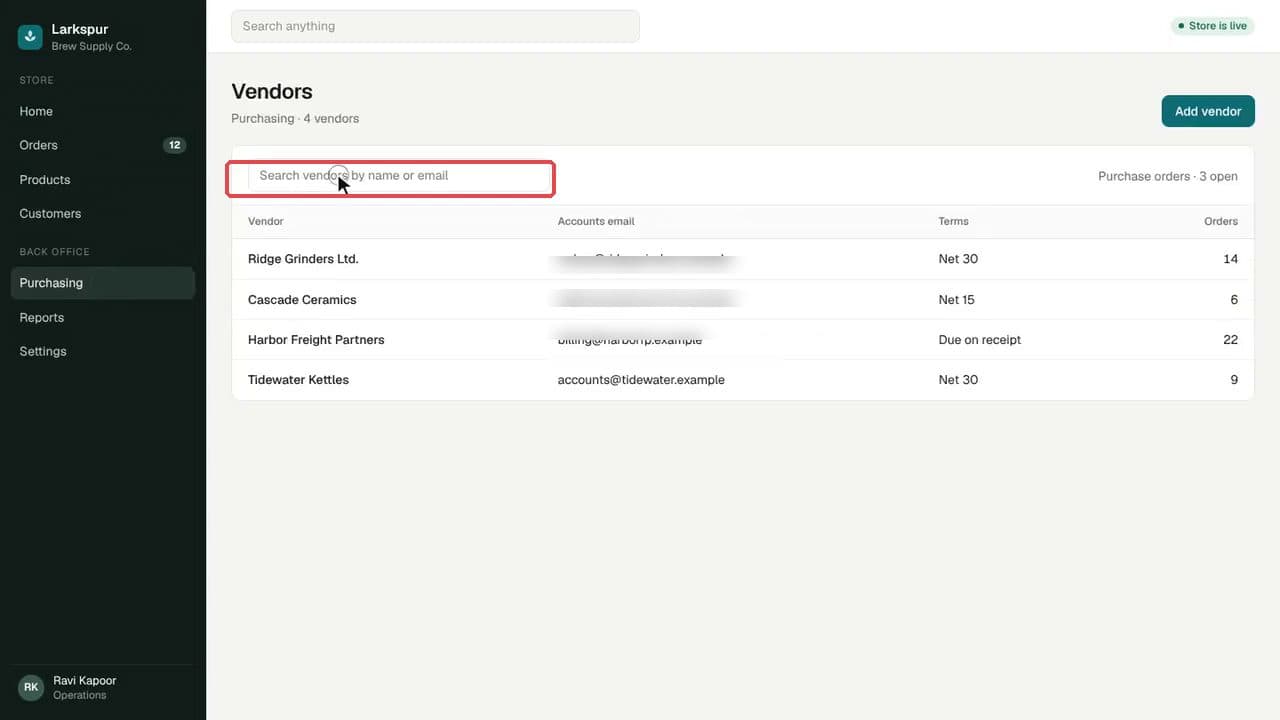
Search for Existing Vendor
- In the Search vendors by name or email field, type the name of the vendor you wish to add, for example, Northfield.
- This step helps prevent creating duplicate vendor records, which mess up the payables report.
 5
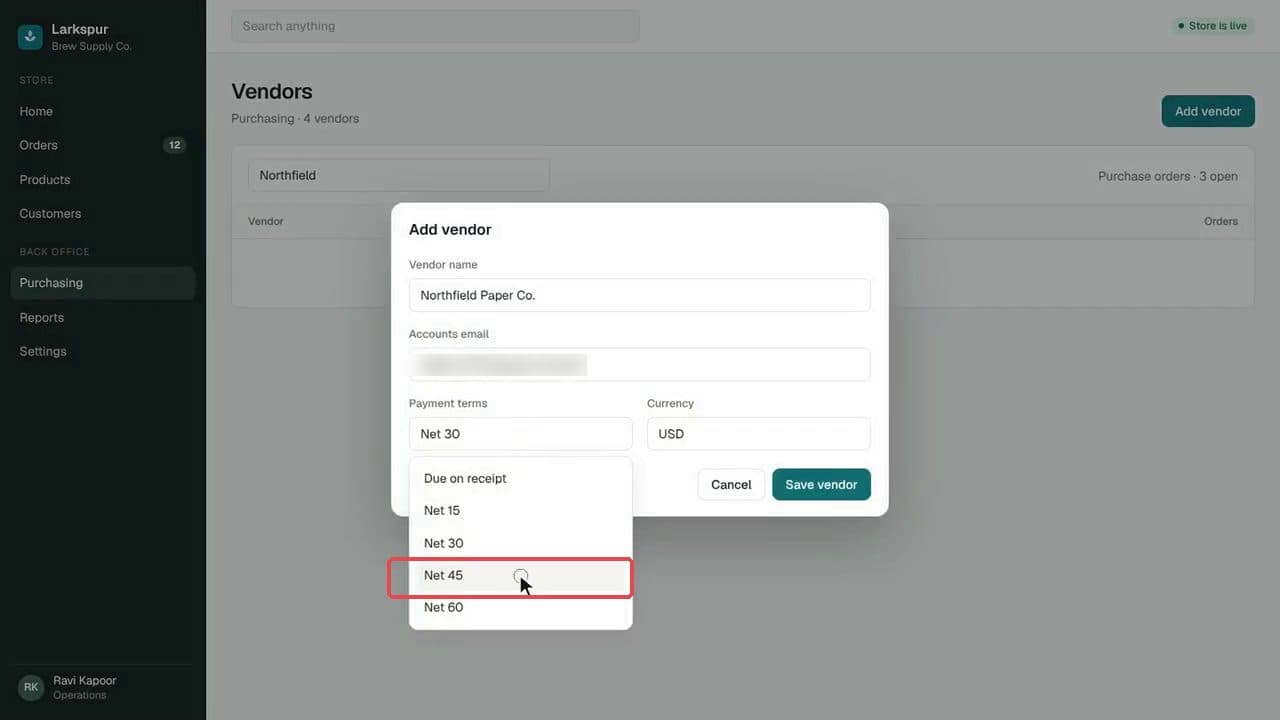
Set Payment Terms
- Click on the Payment terms dropdown menu, which defaults to Net 30.
- Select the correct payment terms for this vendor from the options, for example, Net 45. Always ensure these terms match the contract.
 10
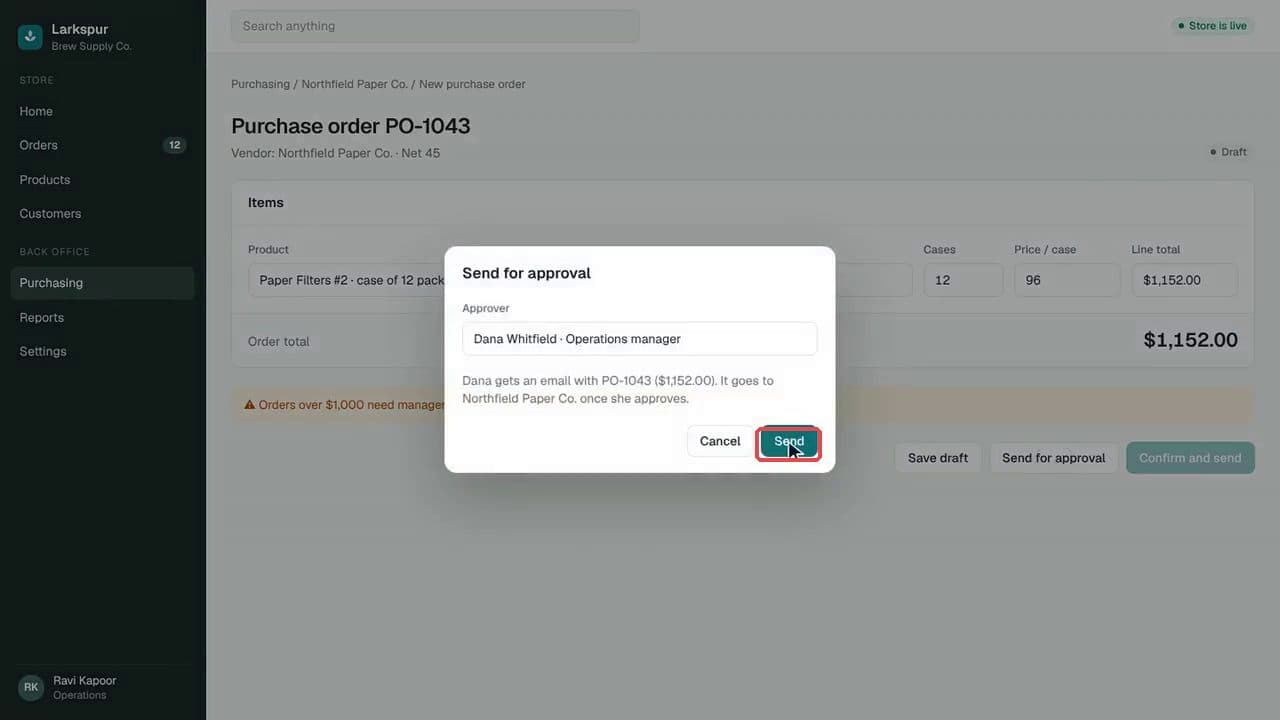
Send Purchase Order for Approval
- If the Order total exceeds $1,000, the system will require manager approval before sending the order.
- Click the Send for approval button.
- In the Send for approval dialog, confirm the correct approver is selected, for example, Dana Whitfield - Operations manager.
- Click Send to submit the order for approval.
SOPs teams like this create
Why recordings beat click-capture for ops
Ops work jumps between the browser, Excel and desktop apps. Click-capture extensions only see what happens inside the browser tab. A screen recording sees everything on screen, so one SOP can cover the ERP, the downloaded spreadsheet and the bank portal in one run. And if you click the wrong menu along the way, Clipstep leaves the wrong turn out and keeps the clean path.
How to record an ops task that makes a good SOP
Questions teams ask
Yes. Clipstep works from the screen recording, so anything visible on screen is captured: web apps, Excel, desktop accounting software, email.