
When someone leaves, their process shouldn’t leave with them.
Record the person doing the work, or upload the handover calls you already scheduled. Clipstep turns each recording into a step-by-step SOP with a screenshot for every step, so the next person can follow it after they’re gone.
Upload a recording you already have, or record your screen right in Clipstep. Nothing to install.
Handover docs get written last, and badly.
The notice period fills up with meetings.
Writing documentation is the first thing that gets dropped.
Handover calls get recorded, then never rewatched.
Nobody scrubs through an hour of Zoom to find step six.
The habits never make it into the doc.
The shortcut, the field they always leave blank, the person they email when it breaks.
How it works for a handover
- 01
List what only they do
Ask for the recurring tasks nobody else knows. Plan one recording per task.
- 02
Record while they talk
They do the task as usual and say why out loud. Use the Clipstep recorder right in your browser, or any tool you already have: Loom, Zoom, Teams, QuickTime or OBS.
- 03
Review together before their last day
Clipstep drafts each SOP in minutes. They correct it while they’re still around to ask.
- 04
Hand it over
Publish links for the team, or on Pro export PDF and Markdown into your wiki.
Run the weekly sales report
A 41-second narrated handover recording in a spreadsheet at Larkspur Brew Supply Co., our made-up demo company.
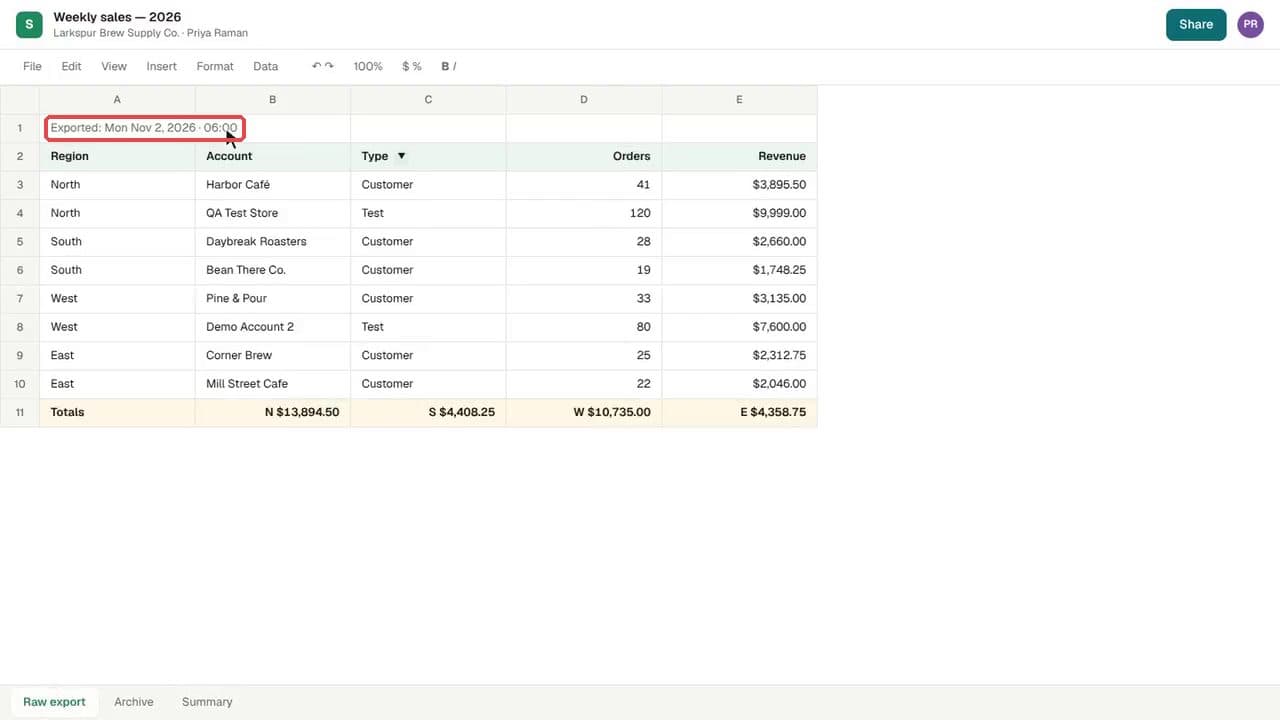 3
Verify the Export Date
- Check the export date displayed at the top of the sheet, for example, 'Exported: Mon Nov 2, 2026 · 06:00'.
- ⚠️ WARNING: Ensure the date is current (today's date). If it displays last week's date, you are looking at outdated numbers.
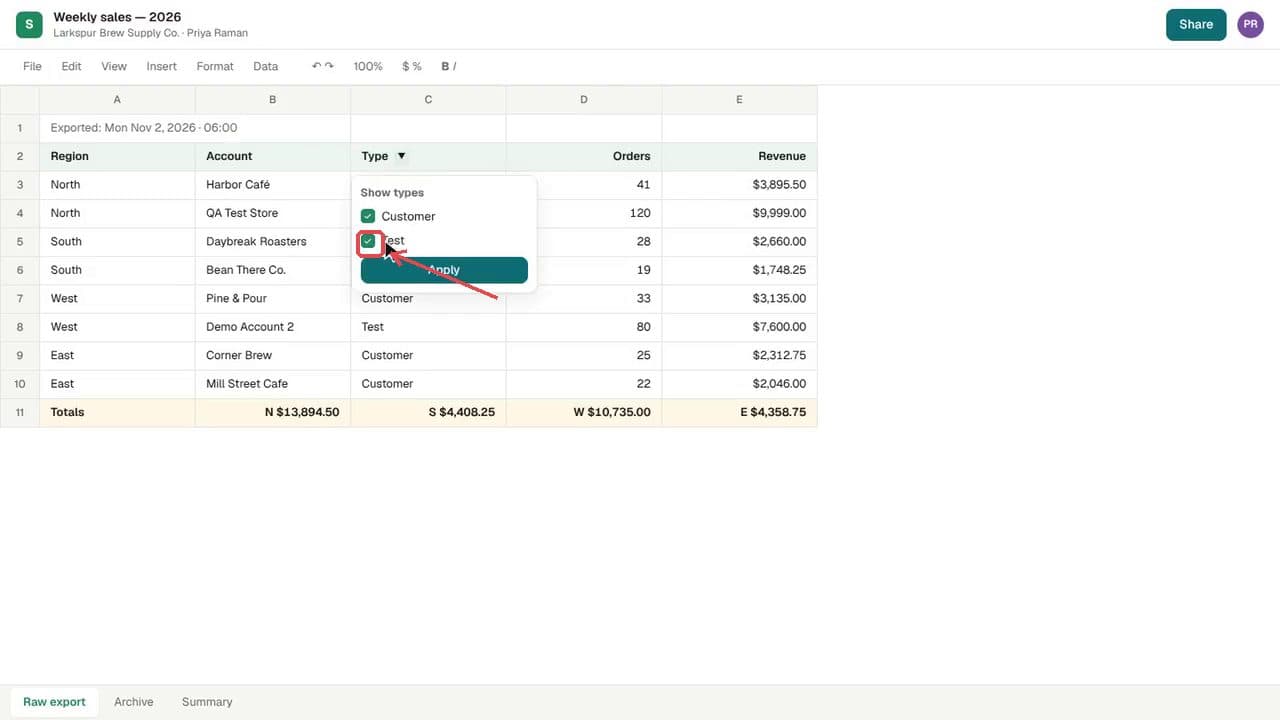 4
Filter Out Test Accounts
- Click the filter dropdown arrow next to the Type column header.
- Uncheck the Test option in the filter menu.
- Click Apply to remove all test accounts from the report totals.
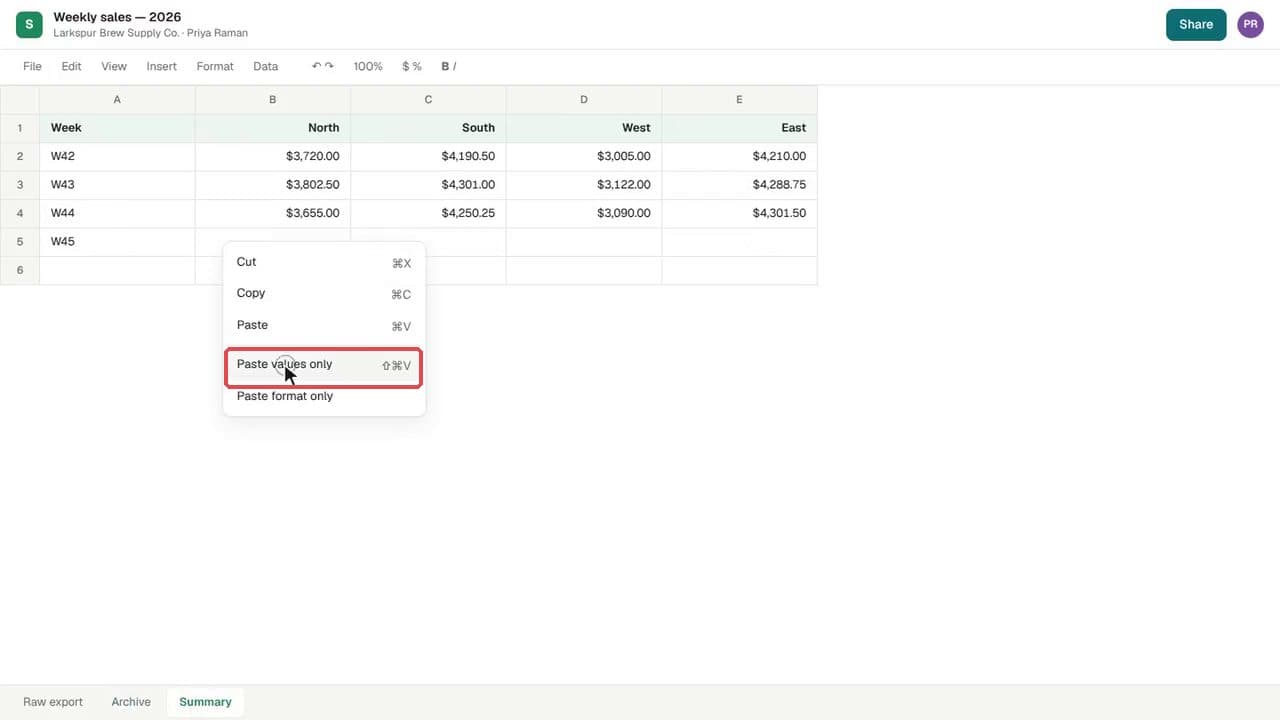 7
Paste Values into the Summary Tab
- Right-click on the first cell of the next available row in the summary table (e.g., B5).
- Select Paste values only from the context menu.
- ⚠️ WARNING: Always paste values only, never formulas, or the summary might break.
SOPs teams like this create
The best time to document is while they’re still here
A handover recording is only half the job. The other half is checking it with the person who knows. Clipstep turns each recording into a draft in minutes, so the review happens in the last week instead of never. Mistakes in the recording aren’t a problem: if they click the wrong thing, Clipstep leaves the wrong turn out and keeps the clean path.
How to get a handover recording that makes a good SOP
Questions teams ask
Yes, as long as the process happens on screen. Split long calls into one file per task to fit your plan’s length limit.